Many people enjoy cooking, but what about recipe organization? Not at all. Thankfully, there is an app called Recipe Keeper that makes this process easier and provides a smooth method for saving, organizing, and even sharing your favorite recipes. Recipe Keeper is a fantastic software for keeping track of your culinary creations, regardless of your level of experience (in the kitchen, occasional cook, or novice).
Let’s explore the features, advantages, and ways that the Recipe Keeper app can transform your culinary experience.
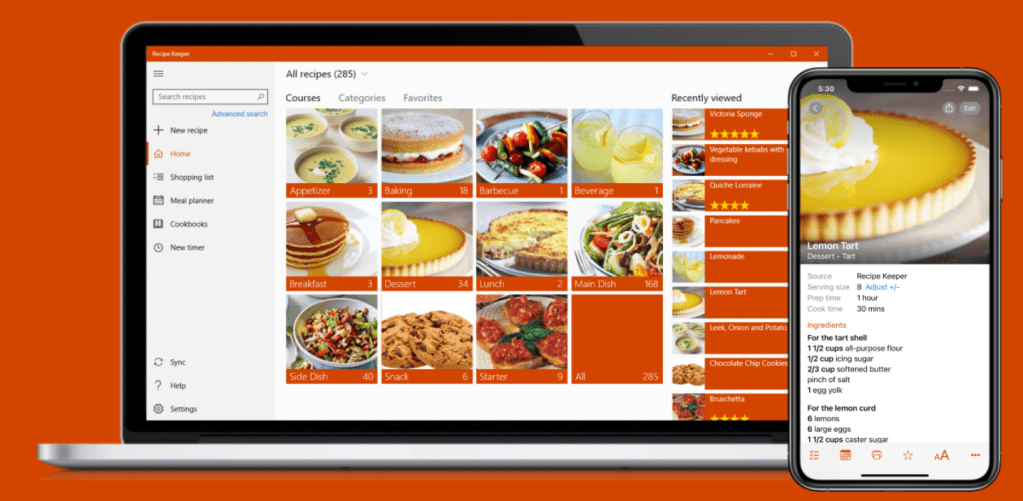
Image Credit: https://recipekeeperonline.com/
What is Recipe Keeper?
Recipe Keeper is a recipe management app available on Windows, Mac, iOS, and Android. It functions as a one-stop shop for organizing, saving, and retrieving recipes. Recipe Keeper compiles all your recipes into a single, easily accessible digital format, eliminating the need for disorganized notes or traditional recipe books. Beyond recipes, it also aids with grocery lists, meal planning, and even nutritional monitoring.
Key Features of the Recipe Keeper App
Easy Recipe Importing
It’s quite easy to add recipes to Recipe Keeper. If you’re organizing family recipes or your creations, you can:
• Manually enter recipes.
• Use the app’s scanning feature to swiftly convert handwritten recipes into digital format.
• You can immediately import recipes from websites by copying and pasting their URLs. Instead of requiring you to manually enter each component, the software automatically records the ingredients, directions, and even the image.
Efficient Recipe Organization
The purpose of Recipe Keeper is to keep your recipes accessible and well-organized. Here’s how:
• You can arrange your recipes according to cuisine (Italian, Mexican, etc.), dietary requirements (vegan, gluten-free, etc.), or course (breakfast, lunch, dinner) using customizable categories.
• To discover what you need quickly, you can use the advanced search functionality to find recipes based on ingredients, titles, or even particular keywords.
• To make searching even simpler, you can use tags to group recipes into categories like “quick meals,” “holiday favorites,” or “family recipes.”
Meal Planning and Calendar Integration
The built-in calendar in Recipe Keeper makes meal planning simple. You may make sure you have everything organized by planning your meals for the coming week or month. Additionally, you can:
• Easily organize and visualize your meal planning by dragging and dropping recipes straight onto the calendar.
• To ensure that you don’t forget to prepare for a special supper, set reminders for meals or events.
• Sync between devices, allowing you to view your meal plans on your desktop or phone from any location.
Shopping List Creation
Recipe Keeper’s ability to generate shopping lists based on your planned recipes is one of its best features. You can:
• Create a shopping list based on a week’s worth of meals or a selection of recipes.
• To make grocery shopping easier, group things by store section (dairy, produce, etc.).
• Distribute the shopping list among family members or roommates so that anyone can help or get supplies.
Nutritional Information and Scaling
Recipe Keeper’s emphasis on nutrition and portion control will be appreciated by health-conscious chefs:
• Many imported recipes have nutritional information, which makes keeping track of calories and nutrients simple.
• You can modify servings according to your needs using automatic scaling, which is particularly useful for larger events or modifying family portions.
Cloud Sync and Cross-Device Access
You can never lose your collection because your data and recipes are safely saved on the cloud. Whether it’s your PC, tablet, or phone, you can:
• Sync between devices.
• When you’re cooking somewhere without Wi-Fi, you can access your recipes offline, which is fantastic.
Recipe Sharing and Exporting
Sharing recipes with friends, family, or other Recipe Keeper users is possible using Recipe Keeper:
• It’s simple to share recipes with loved ones by clicking on social media or email.
• For physical recipe collections, export recipes as PDFs or print them in a printer-friendly format.
• A special feature for users who wish to give recipes in book form is the ability to create personalized cookbooks straight from the app.
Why Choose Recipe Keeper?
Recipe Keeper is superior to other recipe applications for some reasons:
• Comprehensive yet user-friendly interface: All ages and tech skill levels may use it because of its clear and straightforward design.
• Customizable features: From classifying recipes to meal planning, you may modify Recipe Keeper to suit your particular cooking and organizing preferences.
• All-in-one tool: Recipe Keeper eliminates the need for several apps by combining meal planning, grocery list creation, recipe storage, and nutritional tracking.
• User-focused support and updates: To keep Recipe Keeper current and user-friendly, it is regularly updated and incorporates user feedback.
Pricing
There are restrictions on the quantity of recipes and certain features of Recipe Keeper’s free version. You may create several cookbooks, sync between devices, and access an infinite number of recipes by upgrading to the Pro edition. For serious cooks, the Pro edition is a great investment because it offers lifetime value with only one purchase.
For anyone who wants to keep their recipes accessible, well-organized, and attractively displayed, Recipe Keeper is a game-changer. Recipe Keeper’s sophisticated meal planning and shopping list tools, together with its extensive import possibilities, help alleviate the burden of organizing a gourmet collection. The Recipe Keeper app provides a degree of organization and simplicity that enhances the enjoyment of meal planning and preparation for both novice and experienced cooks.
Try Recipe Keeper if you’re prepared to improve your culinary skills and organize your recipe management. This software does live up to its name!
 MACIJI