Technology has never ceased to be an outstanding provider of numerous ways to improve an individual’s daily life. For people with disabilities, this technology is even more interesting because it demolishes walls and helps them become independent. The app leading the way in this arena is Google ‘Voice Access’. In such cases, it acts as a single user-controlled app that facilitates a user to control the Android device without the need for hands causing the device to target the audiences who might have difficulties with touch screen apps due to mobility disability, accidents, arthritis, or paralysis.
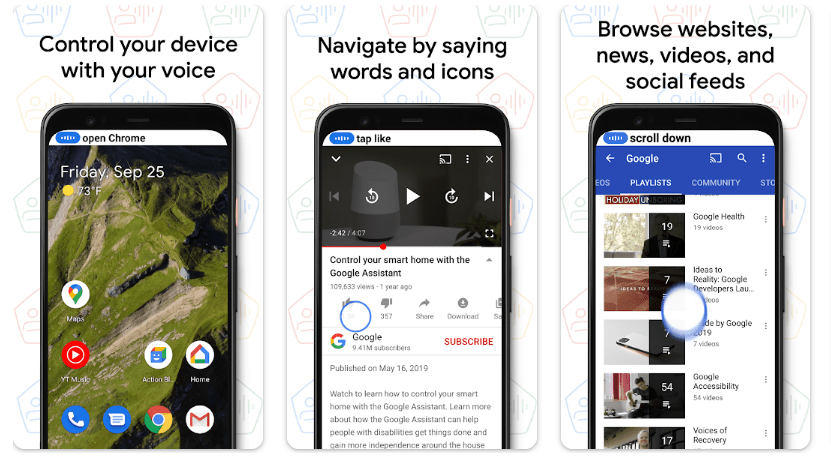
Image Source: https://play.google.com/store/apps/details?id=com.google.android.apps.accessibility.voiceaccess&hl=en_US&pli=1
What is Voice Access?
Google developed Voice Access Android app enables app functionalities through voice commands on mobile. Its principal function is allowing users to use phones or tablets by issuing verbal commands to the device. Powering up a phone or tablet, surfing the web, checking social networking sites, sending texts, browsing through pictures, and even changing device settings can all be done without touching the device.
Unlike applications such as Google Assistant and Siri, which are just basic voice assistants, the accessibility mode described here is also more advanced. Voice Access provides an additional layer of navigation that enables the user to operate his or her devices in more detail through voice commands. It treats each button or any other interactive feature as a set of numbers or labels that can be selected verbally instead of using a finger to swipe, tap, or even type on the device which allows users to perform more elaborate operations.
Who would use Voice Access?
Designed to serve all types of users, Voice Access should be welcomed by various people including:
Individuals experiencing movement constraints: Some individuals with cerebral palsy, patients with spinal cord injuries and muscular dystrophy for instance can perform activities on their devices optimally without using overly reliant touch cues.
Users with temporary disabilities: With an arm in plaster following surgery or other forms of temporary disability, it is still possible for a person to operate a smartphone with a full range of functions.
People suffering from arthritis and other rheumatic illnesses or joint discomfort: Users who are unable to make accurate gestures and other movements owing to the effects of arthritis for example can use this app to navigate by voice.
Busy People: Even people without disabilities can use Voice Access in environments where they need to operate a device without the use of hands e.g. while cooking or driving or when attempting to do more than one thing at a time.
Let us begin with some of the exclusive aspects that make Voice Access a tool worth implementing in terms of accessibility.
Major Highlights-Voice Access and Its Key Features
Voice Navigation in a Full Format.
The application provides the customers with the capability of performing all the actions on the device regardless of its position on the screen. Voice Access covers all the touchable features on the display and enumerates them. The user can verbally specify the number assigned to the required button or action.
For example, if you’re on the home screen and see app icons with numbers next to them, you can say, “Open 5” to launch the fifth app. You can also use voice commands for scrolling, swiping, and typing.
All-Inclusive Command Support
Voice Access can support many verbal instructions. Some of the most widely used commands include these actions:
‘Go back’ or ‘Go home’: Access either the last screen that was viewed or that which has the start menu of the device.
“Tap [number]”: Choose any item or application that has a number linked to it.
“Scroll down/up”: Move up and down items in a web or an application.
“Type [text]”: Input sentences in any field regardless of whether it is a text message or a password that has to be entered.
“Show grid”: In scenarios when touch precision is required, a number grid can be laid over the screen to help you determine the exact point where a tap or action should be performed.
Device Management
Voice Access also supports voice commands for changing various device settings including voice volume, Wi-Fi on/off, Bluetooth on/off, and so on. This way users can manage and change settings such as brightness level or airplane mode without requiring a screen touch.
Customizable Commands
The application’s features include customization, particularly in allowing users to form their commands. For example, users can create a command such as ‘Check email and reply to the latest email’ by combining a few different commands into one action.
Speech Feedback in Voice Access
Voice Access also provides real-time feedback that comes in the form of voice, where it states what it is doing or lets the user know if it cannot perform a task. This is useful for those users who need to see and hear what’s happening when they are using the voice command feature.
Embedded Hands-Free Text Input
One of the most common problems in typing has to do with those who have mobility constraints, but Voice Access has a way out by incorporating a hands-free text input feature. Voice input allows users to enter messages, emails, or even web content directly. In addition to this, the system can also accept voice inputs for the punctuation or editing actions, i.e., “comma,” “let’s delete,” or “replace [word]”.
Multilingual Support
Keeping in mind the worldwide presence of its users, Voice Access also offers support for multiple languages. This also makes the application available to users around the world and therefore gives the potential of reaching out to a wider audience in terms of promoting digital inclusion. It lets the users opt for the language they are comfortable with while using the system and helps keep smooth interaction.
Offline Mode
Voice Access can operate even when the user does not have access to the Internet, which is an essential feature for users who may sometimes be out of stable Wi-Fi or cellular connections. Users will still be able to perform certain rudimentary tasks such as tapping on application icons, scrolling through websites, or making phone calls.
Embedded functions of Voice Access
Other Android applications with similar capabilities such as TalkBack, Switch Access, and Magnification are complemented with Voice Access. This allows the user to customize the assistance experience according to the various options available and helps enhance the accessibility of the user’s device by joining and providing multiple aids.
Why Voice Access is a Game Changer?
Launching Voice Access has been such an important step in matters of digital accessibility. Here’s why:
Encourages Self-Sufficiency: For people who are unable to move easily, the application is crucial for their self-sufficiency in a digital setting. They can read news, browse social media, or work and do everything on their device, on their own.
Reduces Frustration: It can be frustrating trying to control or operate a device with a severely limited range of motion. That frustration is removed when one uses Voice Access as all the actions that would normally require finger work can now be done without the use of hands.
Increases Efficiency: Using Voice Access makes it possible for a person to text, create commands, give various orders, and multitask without using one’s hands making Voice Access useful to disabled persons and even the able-bodied.
Emphasizes the Concept of Inclusive Design: Voice Access also advocates for the concept of inclusive design whereby the ease of use of a product is maximized for every person. Despite being primarily directed towards the disabled, the hands-free function appeals to a wider audience and hence more practical.
Empowering People Through Voice Access
Voice Access is not merely an application for the senses, for many it is a solution that gives them the ability to access and navigate their devices. Such a wide range of inclusive traits enhances interaction with devices additionally enabling independence, efficiency, and easier use.
As technology moves into the future, there will be tools such as Voice Access, which will help to leverage the concept of inclusion beyond functional means to not only build things for the users but also ensure that all users can fit in the world of technology.
Voice Access is free to use and can be downloaded from the Google Play Store. If you or anyone else can benefit from voice-based navigation, we urge you to download Voice Access.
 MACIJI